






What Is Work Order Management?
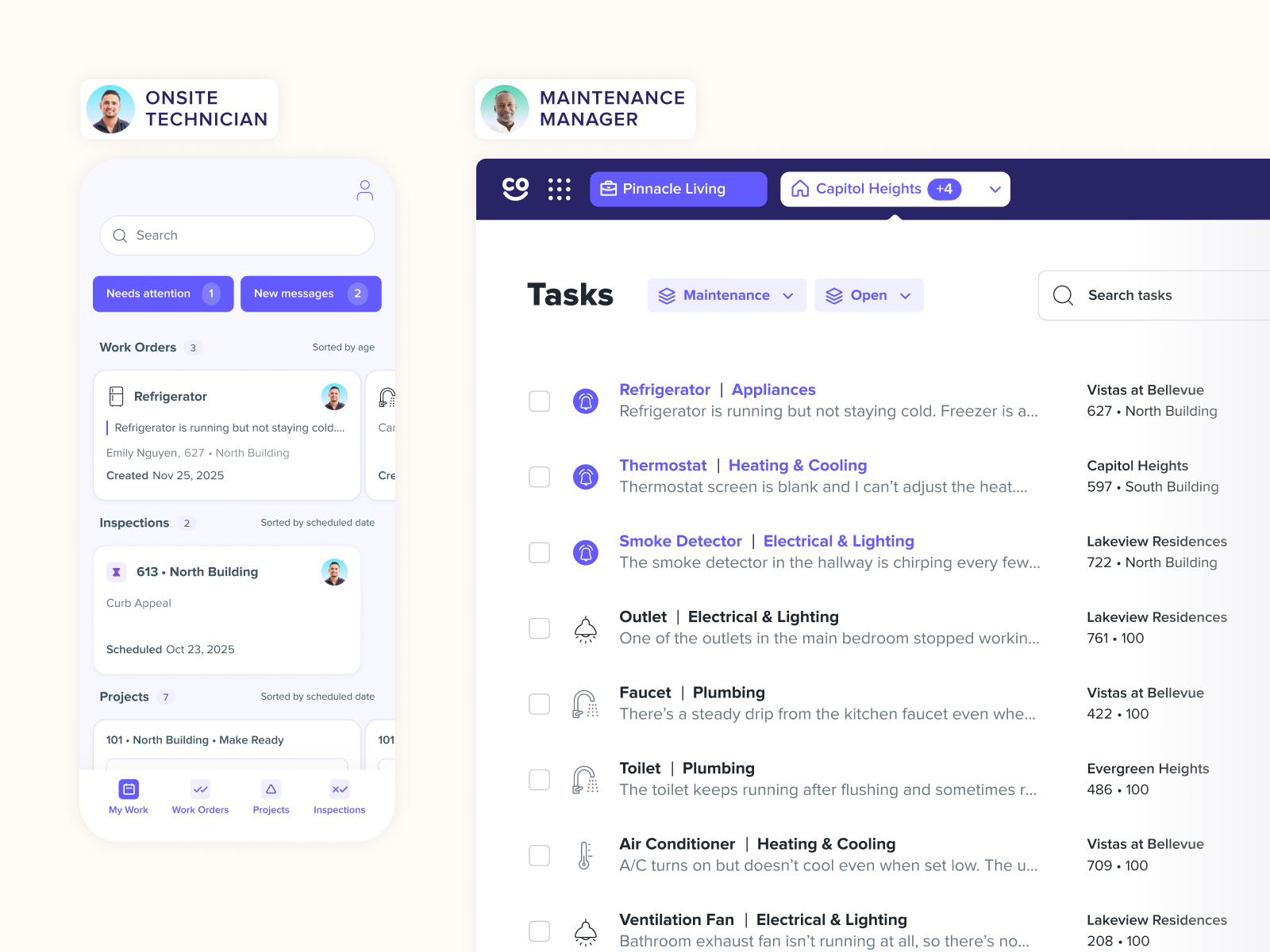
Work order management is the end-to-end process of handling maintenance requests from the moment they’re submitted to the moment the job is closed out and reviewed. A work order is a formal document (or digital record) that authorizes a specific task, specifies who should do it, and tracks its progress and outcome.
For multifamily operators, work orders might cover anything from a broken HVAC unit in a resident’s apartment to a scheduled roof inspection or a make-ready turn between tenancies. Without a structured system in place, these tasks quickly become disorganized — leading to missed repairs, rising costs, frustrated residents, and overworked staff.
A well-designed work order management process gives your team a single source of truth: every task is logged, assigned, tracked, and documented.
A typical work order management process includes several stages:
- Capturing maintenance requests
- Prioritizing and approving requests
- Assigning tasks to technicians
- Scheduling and completing work
- Documenting results and reporting
Why Work Order Management Matters
For operators managing hundreds or thousands of units across multiple communities, informal maintenance processes simply don’t scale. Here’s why investing in structured work order management pays dividends:
1. Stronger Resident Satisfaction & Retention
How quickly and efficiently maintenance issues are handled is one of the most significant factors influencing resident satisfaction and their decision to renew a lease. When residents see that their work orders are resolved promptly and with clear communication, it demonstrates that management cares about their living experience. This fast, transparent approach not only fixes the immediate problem but also builds a foundation of trust and loyalty, making residents feel valued and more likely to stay long-term.
2. Operational Efficiency
A standardized work order workflow eliminates confusion around task ownership by clearly assigning jobs, which reduces duplicate work and ensures accountability. It also helps technicians prioritize their tasks more effectively by providing a clear, consistent process for every job, from assignment to completion.
3. Cost Control
Tracking work orders over time allows you to uncover insightful patterns and trends within your maintenance operations. This data can reveal which specific assets are failing most frequently, helping you pinpoint unreliable equipment that may need replacement. It also highlights which vendors are the most expensive or take the longest to complete a job. With this knowledge, you can see where implementing preventive maintenance could significantly reduce costly emergency repairs and unexpected downtime.
4. Compliance & Accountability
Documented work orders create a comprehensive audit trail, providing a detailed, chronological record of all maintenance activities. This paper trail is invaluable as it protects your organization in potential liability situations by offering clear evidence of work performed. Furthermore, it serves as a straightforward way to demonstrate regulatory compliance to auditors and governing bodies, ensuring your operations meet all required standards.
5. Portfolio-Wide Visibility
For enterprise and strategic operators overseeing multiple properties, consolidated reporting across all communities is essential. This unified approach provides leadership with a comprehensive, high-level overview of performance, trends, and operational needs. By aggregating this data, decision-makers can more accurately forecast future expenses, allocate resources effectively, and ultimately drive smarter capital planning decisions for the entire portfolio

Types of Work Orders
Not all work orders are created equal. Understanding the different types helps your team prioritize appropriately and allocate resources efficiently.
1. Preventive Maintenance Work Orders
Scheduled in advance based on time or usage intervals, preventive maintenance work orders are designed to keep assets in good condition before problems arise.
Think:
- HVAC servicing
- Water heater inspections
- Fire safety checks
- Seasonal roof inspections
These are planned, repeatable, and essential to any proactive maintenance strategy. These tasks are also often generated automatically within a work order management system.
2. Inspection Work Orders
An inspection work order captures the findings from a property or unit walkthrough. In the multifamily, these work orders are generated after routine inspections uncover maintenance issues that require follow-up.
Think:
- Move-in/move-out inspections (punch lists)
- Routine unit inspections
- Common area repairs
- Safety compliance checks
- Amenity checks
They’re often the source that generates corrective or preventive work orders downstream. Inspection platforms like HappyCo can automatically generate work orders from inspection findings.
3. Corrective Work Orders
Corrective work orders are generated when a maintenance issue is identified and needs to be fixed. This identification can happen in a couple of ways: proactively, through a routine inspection carried out by maintenance staff, or reactively, when a resident submits a request to fix something in their unit or a common area.
Think:
- Appliance repairs
- Plumbing leaks
- Broken fixtures
- Lighting replacements
4. Emergency Work Orders
Emergency work orders are triggered by urgent, safety-critical issues. These require immediate response and bypass normal scheduling.
Think:
- Flooding or major leaks
- HVAC failures during extreme weather
- Electrical hazards
- Elevator or fire alarm malfunction
Having a clear escalation path in your work order management process ensures emergencies are handled swiftly.
5. Make-Ready/Turn Work Orders
Specific to multifamily, make-ready work orders manage the full scope of work required to prepare a unit for a new resident.
Think:
- Painting
- Cleaning
- Carpet replacement
- Repair any damage
Efficient turn management directly impacts days-vacant metrics and revenue.
The Benefits of Work Order Management
Implementing a structured work order management system delivers measurable improvements across your operation:
1. Faster Resolution Times
With automated routing, technicians receive the most efficient paths to their job sites, cutting down on travel time. Real-time notifications instantly update them on schedule changes or new assignments, which keeps them on task and helps reduce the overall time-to-close for each service call.
2. Reduced Emergency Spend
Preventive work orders are a proactive approach to maintenance, allowing you to identify and address potential equipment issues before they escalate. By catching these problems early, you can significantly reduce the likelihood of unexpected breakdowns and the costly emergency repairs that often follow.
3. Better Technician Productivity
With clear assignments, technicians know exactly what they need to do before they even arrive on-site. Mobile access allows them to pull up job details, customer history, and equipment manuals from anywhere, eliminating trips back to the office. Plus, prioritized work queues ensure they’re always working on the most critical tasks first. All of this means your techs can spend more time fixing problems and less time tracking down information.
4. Improved Resident Experience
When residents can submit maintenance requests and other inquiries through a simple, accessible system and receive timely, transparent updates on the status of their requests, their overall satisfaction with their living experience increases. This positive experience directly translates into a higher likelihood of them renewing their leases.
5. Data-Driven Decision Making
Work order history provides valuable data that supports more informed budgeting, allowing you to accurately forecast future maintenance expenses based on past spending. It also aids in effective vendor management by tracking performance and costs, and provides a clear basis for long-term capital planning by identifying assets that are nearing the end of their lifecycle.
6. Standardization Across the Portfolio
With standardized, consistent processes implemented across every community, regional managers gain a clear and uniform framework for operations. This allows them to effectively benchmark performance by comparing key metrics between different locations on a true like-for-like basis. By identifying what works best, they can then easily replicate these successful strategies and best practices at scale, driving improvement and efficiency throughout the entire region.
Step-by-Step Work Order Management Process
A reliable work order management process follows a consistent lifecycle — from submission through closure and review. Here’s how it works at each stage:
Step 1: Initiation/Submission
A work order is created — either by a resident submitting a maintenance request, a technician flagging an issue during an inspection, or a scheduled preventive maintenance trigger. In modern systems, submission happens digitally via a resident portal, mobile app, or PMS integration.
Step 2: Evaluation & Approval
The maintenance coordinator or property manager reviews the request, assesses urgency, and determines whether it should be addressed in-house or sent to a vendor. High-cost or out-of-scope work may require management approval before proceeding.
Step 3: Planning
Once approved, the right resources are identified: which technician has the skills, what materials or parts are needed, and what the estimated labor time is. For complex jobs, this may involve coordinating with vendors or ordering supplies in advance.
Step 4: Scheduling
The work order is assigned to a technician or vendor and placed on the schedule. Priority level — routine, urgent, or emergency — determines placement. Resident coordination (if unit access is required) happens here.
Step 5: Execution
The technician completes the work, documents what was done, logs materials used, and captures any relevant photos or notes directly in the system. Mobile-first tools make this seamless in the field.
Step 6: Completion & Closure
Once work is finished, the work order is marked complete. If resident-facing, a follow-up notification is sent. Invoices or labor costs are captured before the record is closed.
Step 7: Work Order Review/Analysis
Closed work orders feed into reporting dashboards that track response time, cost per work order, repeat repairs, and team productivity. This data drives continuous improvement across your portfolio.
Work Order Management Process Examples
Example 1: Resident Maintenance Request
- Resident submits request for leaking sink.
- The property manager reviews and assigns a technician.
- The technician diagnoses the issue and repairs plumbing.
- The work order is closed with notes and photos.
Example 2: Inspection-Generated Work Order
- Maintenance inspection identifies damaged flooring.
- Inspection software creates a work order automatically.
- The technician schedules the repair.
- The repair is documented and closed.
Tools like HappyCo help streamline these scenarios by linking inspections directly to work orders.
How to Manage & Optimize the Work Order Process
For operators looking to improve their work order management process, here are the highest-impact levers to pull:
1. Digitize Everything
Relying on paper-based or spreadsheet-driven work order systems can be a major roadblock to growth. These outdated methods often create significant bottlenecks, leading to delays as information is manually passed from one person to another. They are also prone to human error, from misplaced documents to incorrect data entry, and can result in communication gaps between teams. To scale effectively, a centralized digital platform is non-negotiable. It streamlines operations, minimizes mistakes, and ensures everyone has real-time access to the same information.
2. Integrate with Your PMS
Connecting your work order system directly with your property management software ensures that critical information such as resident data, lease status, and specific unit details are always current and automatically updated. This seamless integration streamlines your workflow by reducing the need for duplicate data entry, minimizing the risk of human errors, and ensuring your team has access to the most accurate information at all times.
3. Use Mobile-First Tools
Field technicians require constant access to critical information while on the job, including their daily assignments, detailed service histories for the units they are working on, and tools for documenting their work in real time. Without mobile access, they are forced to make inefficient trips back to the office to retrieve or file paperwork. By equipping them with mobile apps, companies can dramatically improve on-site execution, reduce downtime, and ensure better compliance with service protocols.
4. Set SLA Benchmarks
Establish and clearly define expected response and resolution times based on the specific type of work order. For instance, you could categorize tasks into different priority levels, such as setting a target of a 2-hour response for high-priority emergencies and a 48-hour window for standard, routine requests. Once these benchmarks are in place, it’s crucial to consistently monitor your team’s performance against these targets to ensure efficiency and accountability.
5. Automate Recurring Work Orders
Automate your preventive maintenance schedules instead of manually creating them each time. Relying on manual processes is not only time-consuming but also prone to human error, which can lead to missed inspections or equipment failures. Automation ensures consistency and that nothing falls through the cracks, keeping your operations running smoothly and reliably.
6. Analyze & Act on Data
Don’t just collect work order data — put it to work. With the right analytics, you can transform raw numbers into actionable insights. Pinpoint which asset categories are costing you the most in repairs and replacements, discover which types of work orders consistently take the longest to resolve, and identify which of your vendors are the most reliable and efficient. This deeper understanding allows you to make smarter, data-driven decisions that can save you time and money.
Best Practices for Work Order Management
The most operationally mature multifamily organizations apply these work order management best practices consistently:
1. Use Standardized Work Order Templates
Standardize work order categories and priority levels across all of your communities. By creating a uniform system, you ensure that the data you collect is consistent and can be accurately compared portfolio-wide, leading to better insights and decision-making.
2. Document Repairs Thoroughly
Documenting photos of completed work is essential for both liability protection and quality assurance. Having a clear visual record can safeguard your business against potential claims and serves as proof that the job was finished to a high standard. In addition to photos, keeping detailed notes and a thorough maintenance history for each client or project can help your team identify and track recurring problems more effectively, leading to better long-term solutions.
3. Integrate Inspections & Work Orders
Connecting property inspections directly to work orders empowers your maintenance teams to resolve identified issues with greater speed and efficiency. This seamless integration ensures that nothing falls through the cracks. More importantly, it allows you to close the communication loop with your residents by automatically notifying them at every stage of the process — from the moment their work order is received and scheduled, to when it’s in progress, and finally, when the job is complete.
4. Monitor Maintenance Performance
Regularly review key metrics to continuously improve your maintenance operations. This involves conducting frequent audits of your work orders to pinpoint any issues, such as orders that are aging without action, remain incomplete, or have been closed out improperly. By identifying these bottlenecks, you can refine your processes for better efficiency.
How to Choose Work Order Management Software
Selecting the right system is critical for implementing an effective work order management program. When evaluating work order management software, multifamily operators should look for the following capabilities:
1. PMS Integration
Native or deep integration with your existing property management system (PMS) — such as Yardi, RealPage, or Entrata — is essential for seamless operations. This level of connection ensures that data flows automatically between systems, maintaining accuracy and eliminating the need for manual data entry. By syncing information in real-time, you can achieve greater workflow automation, streamline processes like leasing and accounting, and provide a better experience for both staff and residents.
2. Mobile Accessibility
To effectively manage their work in the field, technicians need more than just a watered-down web view. They require a full-featured, native mobile app that offers robust functionality and a seamless user experience, even when offline.
3. Resident-Facing Request Portal
Residents should have the convenience of submitting and tracking maintenance or service requests through an online portal or mobile app, eliminating the need to call the office during business hours.
4. Automated Preventive Maintenance Scheduling
Look for a system that offers rule-based automation. This feature will allow you to set up predefined rules that automatically generate and assign recurring work orders based on specific triggers, such as time intervals or equipment meter readings, eliminating the need for any manual effort.
5. Reporting & Analytics
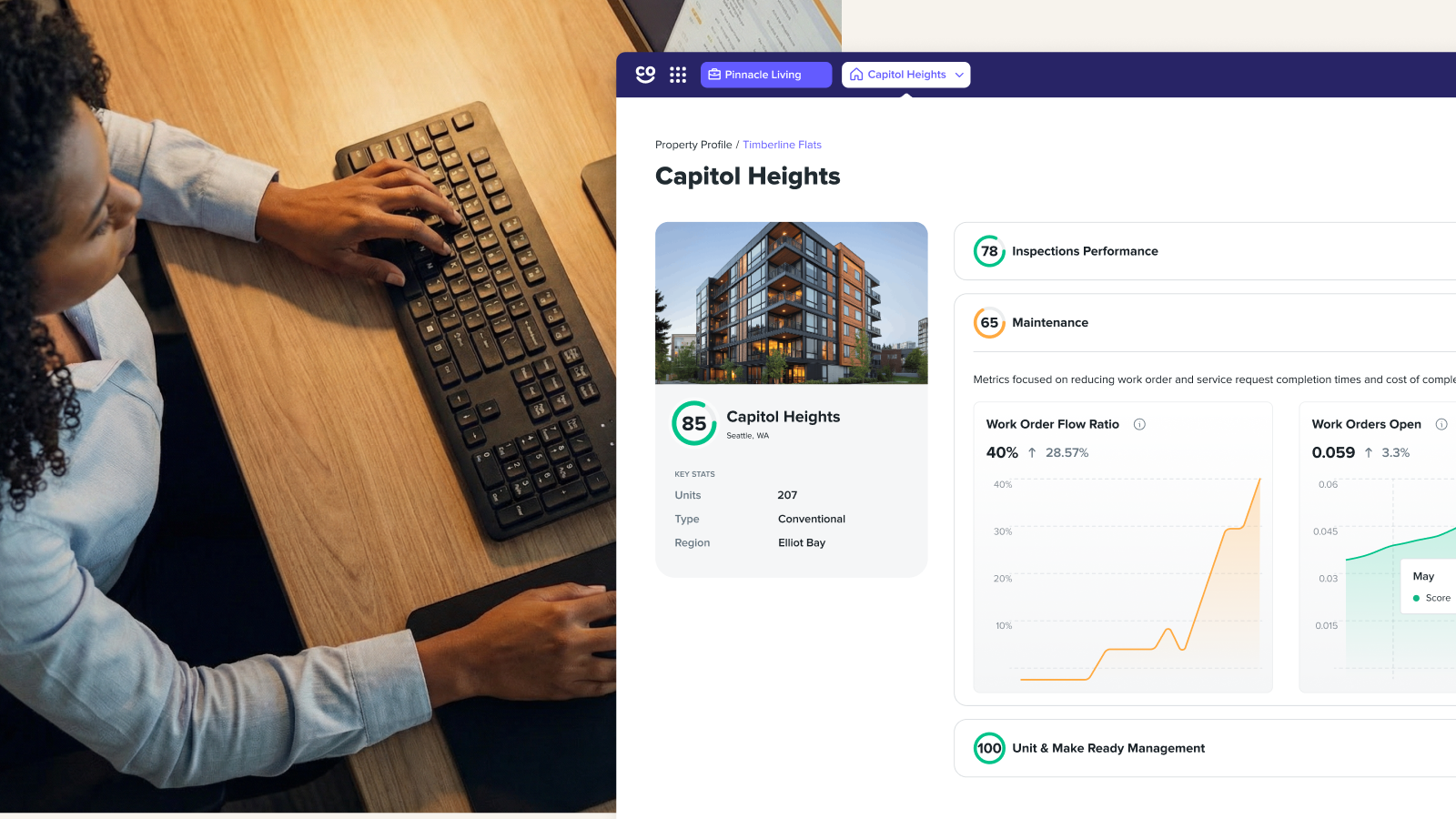
Operational leaders rely on portfolio-level dashboards to gain a comprehensive overview of performance across all their facilities. These dashboards are critical for tracking key performance indicators (KPIs) like Mean Time to Repair (MTTR) which measures the average time it takes to complete repairs, as well as cost per work order and the aging of open orders. By monitoring these metrics, leaders can identify trends, pinpoint inefficiencies, and make data-driven decisions to optimize their maintenance operations and budget effectively.
6. Configurable Workflows
Your specific business rules — such as your escalation paths for urgent issues, financial approval thresholds for different management levels, and clear definitions for ticket priorities — need to be accurately configured and reflected within the platform to ensure it operates according to your company’s established procedures.
7. Scalability
A solution that works for one community must be robust and flexible enough to perform just as reliably when scaled across 100 different communities, each with its own unique challenges and requirements.
The good news: Platforms like HappyCo allow property teams to manage inspections and work orders within one centralized system — perfect for scaling from hundreds of units to hundreds of thousands.
Beyond the Wrench: Why Work Order Management is Your Multifamily Secret Weapon
Work order management isn’t just a maintenance function — it’s a strategic capability. For multifamily operators managing large, complex portfolios, having a disciplined, data-driven work order management process directly impacts resident satisfaction, team productivity, asset longevity, and financial performance. The difference between a reactive maintenance team and a proactive one often comes down to process and technology. When both are in place, operators gain control — and residents notice.
FAQs
Who Creates a Work Order?
Work orders can be created by residents (via a maintenance request portal), maintenance technicians (following an inspection), property managers (in response to a complaint or scheduled task), or automatically by a maintenance management system based on a preventive maintenance schedule.
What Are the Main Approaches in Work Order Management?
The two primary approaches are reactive work order management (responding to issues as they arise) and proactive work order management (using preventive and predictive scheduling to address issues before they become problems). Best-in-class multifamily operators use a combination of both.
What Are the Stages of Work Order Management?
The core stages are: submission, evaluation and approval, planning, scheduling, execution, completion and closure, and review/analysis. Each stage should be documented in a centralized system for full accountability.
Lauren Seagren is the Content Marketing Specialist at HappyCo, where she leads the company’s content strategy and storytelling across channels. She develops and optimizes campaigns, blogs, case studies, and enablement materials, while building the systems that help content scale and align across teams. Prior to HappyCo, Lauren led content and brand strategy across SaaS startups, creative agencies, and growth-stage companies, bringing more than a decade of experience driving measurable growth across B2B and B2C organizations.


